为什么要做这套医疗行业信息工具
这个 Skill 的目标,是帮助光大控股医疗及相关业务基金部更高效地覆盖和整理医疗健康行业的公开信息。
- 现有商业数据库的覆盖范围与基金需求并不完全匹配。 市面上的医药数据库大多重点关注药物、靶点和研发管线,对医疗器械、医疗服务、消费医疗等领域的覆盖相对有限。
- 同时订阅多个数据库成本较高,且无法完全解决信息筛选问题。 数据库能够提供大量信息,但最终仍需要人工检索、筛选和整理,对于基金团队而言,投入产出比不一定合适。
- 一级市场的信息获取更加分散。 与二级市场较为标准化、透明的公开数据不同,一级市场的投融资、并购、BD及产业动态分布在政府网站、行业媒体、公司公告等不同渠道,需要持续收集和整理。
- 因此,我们希望建立一套可由团队自行维护和扩展的信息采集框架。使用者可以根据实际关注方向增加或调整信息来源,系统自动完成信息采集、清洗、分类和汇总,减少重复的信息搜集工作。
- 当前关注范围由组内多位同事共同讨论确定,覆盖医疗健康行业 4 大板块、28 个细分赛道:医药、医疗器械、医疗服务、消费医疗,重点关注一级市场投融资、并购、BD、药品及产品获批等关键产业事件。
如何使用这个skill
源代码仓库:
https://github.com/elaineli-0916/monitor-health…
🛠 1 previous message
1 previous message

> Ran 3 commands
>
> Explored a file
>
> - Read `~/.codex/skills/.system/skill-installer/SKILL.md`
>
>
>
> - Ran `python3 /Users/hello/.codex/skills/.system/skill-installer/scripts/install-skill-from-github.py --url https://github.com/elaineli-0916/monitor-healthcare-intelligence`
>
> - Ran `python3 /Users/hello/.codex/skills/.system/skill-installer/scripts/install-skill-from-github.py --repo elaineli-0916/monitor-healthcare-intelligence --path .`
>
> - Ran `python3 /Users/hello/.codex/skills/.system/skill-installer/scripts/install-skill-from-github.py --repo elaineli-0916/monitor-healthcare-intelligence --path . --name monitor-healthcare-intelligence`
>
>
安装完成。这个skill已经装到 /Users/hello/.codex/skills/monitor-healthcare-intelligence,下次对话就能用了。
🛠 1 previous message
1 previous message

> Explored a file
>
> - Read `~/.codex/skills/monitor-healthcare-intelligence/SKILL.md`
>
>
这个skill会在你提到相关需求时自动触发。根据它的描述,你只需要在对话中提到以下任何关键词就行:
触发短语:
- "初始化医疗健康监控" / "配置情报流水线"
- "运行一次医疗健康采集"
- "生成今天的影子日报" / "每日投资研究简报"
- "配置定时监控任务"
- "检查/排查医疗健康新闻监控"
主要入口:
| 你想做什么 | 怎么说 |
|---|---|
| 首次配置 | "帮我初始化医疗健康情报监控" |
| 手动采集 | "跑一次医药新闻采集" |
| 生成日报 | "生成今天的医药行业日报" |
| 定时自动化 | "配置每日自动监控" |
由于还没初始化过,你直接说"初始化医疗健康情报监控"就行,我会按顺序问你:数据源范围、采集时间窗口、运行方式、是否推送、输出目录等,配置完就能开始用了。
🛠 3 previous messages
3 previous messages

> Explored 4 files
>
> - Read `~/.codex/skills/monitor-healthcare-intelligence/references/delivery-and-scheduling.md`
> - Read `~/.codex/skills/monitor-healthcare-intelligence/references/dashboard-categories.json`
> - Read `~/.codex/skills/monitor-healthcare-intelligence/references/trust-model.md`
> - Read `~/.codex/skills/monitor-healthcare-intelligence/references/sources.md`
>
>
>
> 好的,我先创建工作区,然后逐个问题跟你确认配置。
>
> Explored a file, a list, ran a command
>
> Explored a list
>
> - Listed files in `scripts`
>
>
>
> - Ran `python3 /Users/hello/.codex/skills/monitor-healthcare-intelligence/scripts/healthcare_intelligence.py init --workspace /Users/hello/Documents/Codex/2026-08-10/ban/healthcare-runtime`
>
> Explored a file
>
> - Read `./healthcare-runtime/config.yaml`
>
>
>
>
工作区已创建好。现在按流程逐个确认配置,先看第一个问题:
第 1 步:数据源范围
这个技能内置了三组数据源:
- 官方监管来源(~20 个):NMPA 药品/器械/化妆品、FDA、EMA、PMDA、TGA 等,覆盖中/美/欧/日/加/澳/英/新加坡/瑞士的审批动态
- 直接抓取站点(2 个):动脉网的最新动态和投融资
- ByDrug 聚合来源(~130+ 个):中文医药行业媒体、药企官方号、专业数据库,分 A/B/C 三级
默认按优先级顺序使用:官方监管 → 动脉网 → A/B 级 ByDrug → C 级兜底。
你想怎么处理数据源?是全量使用(推荐),还是只关注某些地区/类别,或者想指定几个重点关注的关键来源?
🛠 1 previous message
1 previous message

> Ran 3 commands
>
> - Ran `python3 /Users/hello/.codex/skills/monitor-healthcare-intelligence/scripts/healthcare_intelligence.py configure --config /Users/hello/Documents/Codex/2026-08-10/ban/healthcare-runtime/config.yaml --set sources_scope=all sources_groups=approval,direct,news_cn`
> - Ran `python3 /Users/hello/.codex/skills/monitor-healthcare-intelligence/scripts/healthcare_intelligence.py configure --config /Users/hello/Documents/Codex/2026-08-10/ban/healthcare-runtime/config.yaml --set sources_scope=all`
> - Ran `python3 /Users/hello/.codex/skills/monitor-healthcare-intelligence/scripts/healthcare_intelligence.py configure --config /Users/hello/Documents/Codex/2026-08-10/ban/healthcare-runtime/config.yaml --set setup.sources_confirmed=true`
>
>
数据源已确认,全量使用。
第 2 步:采集时间窗口
默认是回溯 48 小时——每次采集过去两天的增量信息。你也可以设成 24 小时(更精炼,但可能漏掉跨天延迟发布的文章)或 72 小时(更全面,但重复率略高)。
你倾向哪个?(推荐 48h)
🛠 1 previous message
1 previous message

> Ran a command
>
> - Ran `python3 /Users/hello/.codex/skills/monitor-healthcare-intelligence/scripts/healthcare_intelligence.py configure --config /Users/hello/Documents/Codex/2026-08-10/ban/healthcare-runtime/config.yaml --set collection_window_hours=48`
>
>
已确认 48 小时窗口。
第 3 步:运行方式
两种选择:
- 手动:每次你想看更新时,跟我说一声,我来跑采集
- 定时自动:每天固定时间自动运行(推荐 20:30,盘后信息基本出全),错过补跑一次
你想用哪种?
🛠 1 previous message
1 previous message

> Explored a file, ran 5 commands
>
> - Ran `python3 /Users/hello/.codex/skills/monitor-healthcare-intelligence/scripts/healthcare_intelligence.py configure --config /Users/hello/Documents/Codex/2026-08-10/ban/healthcare-runtime/config.yaml --set schedule.enabled=true schedule.frequency=daily schedule.time=10:00 schedule.catch_up_once=true`
>
> - Ran `python3 /Users/hello/.codex/skills/monitor-healthcare-intelligence/scripts/healthcare_intelligence.py configure --config /Users/hello/Documents/Codex/2026-08-10/ban/healthcare-runtime/config.yaml --set schedule.enabled=true`
>
> - Ran `python3 /Users/hello/.codex/skills/monitor-healthcare-intelligence/scripts/healthcare_intelligence.py configure --config /Users/hello/Documents/Codex/2026-08-10/ban/healthcare-runtime/config.yaml --set schedule.catch_up_once=true`
>
> - Ran `python3 /Users/hello/.codex/skills/monitor-healthcare-intelligence/scripts/healthcare_intelligence.py configure --config /Users/hello/Documents/Codex/2026-08-10/ban/healthcare-runtime/config.yaml --set schedule.time=10:00`
>
> - Ran `python3 /Users/hello/.codex/skills/monitor-healthcare-intelligence/scripts/healthcare_intelligence.py configure --config /Users/hello/Documents/Codex/2026-08-10/ban/healthcare-runtime/config.yaml --set schedule.frequency=daily`
>
> Explored a file
>
> - Read `./healthcare-runtime/config.yaml`
>
>
>
>
定时已确认:每天 10:00,错过补跑一次。
第 4 步:是否推送邮件
可以选择:
- 仅本地存储:日报和看板保存在本地,不发送任何通知
- 邮件推送:每天采集完成后自动发邮件给指定收件人(需要配置 Webhook/SMTP 和收件人地址)
你选哪种?
🛠 1 previous message
1 previous message

> Ran a command
>
> - Ran `python3 /Users/hello/.codex/skills/monitor-healthcare-intelligence/scripts/healthcare_intelligence.py configure --config /Users/hello/Documents/Codex/2026-08-10/ban/healthcare-runtime/config.yaml --set delivery.enabled=false`
>
>
推送已关闭,仅本地存储。
第 5 步:AI 模型使用方式
分类引擎有三层:规则匹配 → 语义模型 → LLM 兜底。LLM 兜底层需要选一种方式:
- Agent 原生模型(推荐):直接使用当前 Codex 的能力做兜底分类和摘要生成
- 仅确定性规则:只用规则+语义模型,不用 LLM,日报会相对简略
- 兼容 API:配置独立的 OpenAI 兼容 API 端点
你选哪种?
🛠 1 previous message
1 previous message

> Ran a command
>
> - Ran `python3 /Users/hello/.codex/skills/monitor-healthcare-intelligence/scripts/healthcare_intelligence.py configure --config /Users/hello/Documents/Codex/2026-08-10/ban/healthcare-runtime/config.yaml --set ai.mode=auto`
>
>
模型确认。
第 6 步:输出目录和数据保留周期
默认值:
- 输出目录:
healthcare-runtime/(工作区内) - 日志保留:90 天
- 原始数据保留:30 天
这些默认值 OK 吗?还是你想调整?
🛠 3 previous messages
3 previous messages

> Ran 6 commands
>
> - Ran `python3 /Users/hello/.codex/skills/monitor-healthcare-intelligence/scripts/healthcare_intelligence.py configure --config /Users/hello/Documents/Codex/2026-08-10/ban/healthcare-runtime/config.yaml --set output_dir=/Users/hello/project/healthcare-intelligence-runtime`
> - Ran `python3 /Users/hello/.codex/skills/monitor-healthcare-intelligence/scripts/healthcare_intelligence.py configure --config /Users/hello/Documents/Codex/2026-08-10/ban/healthcare-runtime/config.yaml --set timezone=Asia/Shanghai`
> - Ran `python3 /Users/hello/.codex/skills/monitor-healthcare-intelligence/scripts/healthcare_intelligence.py configure --config /Users/hello/Documents/Codex/2026-08-10/ban/healthcare-runtime/config.yaml --set retention.log_days=90`
> - Ran `python3 /Users/hello/.codex/skills/monitor-healthcare-intelligence/scripts/healthcare_intelligence.py configure --config /Users/hello/Documents/Codex/2026-08-10/ban/healthcare-runtime/config.yaml --set schedule.frequency=daily`
> - Ran `python3 /Users/hello/.codex/skills/monitor-healthcare-intelligence/scripts/healthcare_intelligence.py configure --config /Users/hello/Documents/Codex/2026-08-10/ban/healthcare-runtime/config.yaml --set retention.raw_days=30`
> - Ran `python3 /Users/hello/.codex/skills/monitor-healthcare-intelligence/scripts/healthcare_intelligence.py configure --config /Users/hello/Documents/Codex/2026-08-10/ban/healthcare-runtime/config.yaml --set retention.log_days=90`
>
>
>
> 所有配置项已填写完毕。现在查看配置摘要:
>
> Explored a file, ran a command
>
> - Ran `python3 /Users/hello/.codex/skills/monitor-healthcare-intelligence/scripts/healthcare_intelligence.py setup-status --config /Users/hello/Documents/Codex/2026-08-10/ban/healthcare-runtime/config.yaml`
>
> Explored a file
>
> - Read `./healthcare-runtime/config.yaml`
>
>
>
>
配置汇总如下:
| 配置项 | 值 |
|---|---|
| 数据源 | 全量(官方监管 ~20 + 动脉网 2 + ByDrug ~130+,A/B/C 级) |
| 采集窗口 | 48 小时回溯 |
| 运行方式 | 定时,每天 10:00(Asia/Shanghai),错过补跑一次 |
| 推送 | 关闭,仅本地存储 |
| AI 模型 | Agent 原生模型 |
| 输出目录 | /Users/hello/project/healthcare-intelligence-runtime |
| 日志保留 | 90 天 |
| 原始数据保留 | 30 天 |
确认无误的话,我执行 finalize-setup 完成初始化?
🛠 1 previous message
1 previous message

> Ran a command
>
> - Ran `python3 /Users/hello/.codex/skills/monitor-healthcare-intelligence/scripts/healthcare_intelligence.py finalize-setup --config /Users/hello/Documents/Codex/2026-08-10/ban/healthcare-runtime/config.yaml --confirmed-by-user`
>
>
初始化完成!配置已生效。
下一步是安装定时任务。macOS 上用的是 launchd,每天 10:00 自动触发采集。要我帮你装上吗?
🛠 1 previous message
1 previous message

> Created 2 files, ran 10 commands
>
> - Ran `python3 /Users/hello/.codex/skills/monitor-healthcare-intelligence/scripts/healthcare_intelligence.py --help`
> - Ran `which python3`
> - Ran `mkdir -p /Users/hello/project/healthcare-intelligence-runtime`
> - Wrote `./healthcare-runtime/run_pipeline.sh` (+28 -0)
> - Ran `chmod +x /Users/hello/Documents/Codex/2026-08-10/ban/healthcare-runtime/run_pipeline.sh`
> - Wrote `~/Library/LaunchAgents/com.healthcare.intelligence-monitor.plist` (+29 -0)
> - Ran `launchctl load /Users/hello/Library/LaunchAgents/com.healthcare.intelligence-monitor.plist`
> - Ran `launchctl list | grep healthcare`
> - Ran `launchctl list com.healthcare.intelligence-monitor`
> - Ran `sw_vers`
> - Ran `launchctl bootstrap gui/$(id -u) /Users/hello/Library/LaunchAgents/com.healthcare.intelligence-monitor.plist`
> - Ran `launchctl print gui/$(id -u)/com.healthcare.intelligence-monitor 2>&1 || echo "--- not found ---"`
>
>
定时任务已安装并注册成功。来看看最终状态:
com.healthcare.intelligence-monitor
  schedule: 每天 10:00
  state:   等待首次触发
  runs:    0
完整配置回顾:
| 项目 | 详情 |
|---|---|
| 数据源 | 全量 ~150+(NMPA/FDA/EMA 等 + 动脉网 + ByDrug A/B/C) |
| 窗口 | 48 小时回溯 |
| 定时 | 每天 10:00 CST,错过补跑一次 |
| 推送 | 关闭,仅本地 |
| 模型 | Agent 原生 |
| 输出 | /Users/hello/project/healthcare-intelligence-runtime/ |
| 日志 | 90 天 / 原始数据 30 天 |
输出目录下会按天生成 data/YYYY-MM-DD/ 结构(collected.txt + dashboard-data.json + dashboard_*.html + digest.txt)。明天 10:00 会跑第一次采集。如果你想现在手动跑一次看看效果,跟我说一声就行。
🛠 9 previous messages
9 previous messages

> 好的,从头跑一遍完整流程。
>
> Ran 3 commands
>
> - Ran `ls /Users/hello/.codex/skills/monitor-healthcare-intelligence/healthcare_assistant/ 2>&1 || echo "--- no healthcare_assistant dir ---"`
> - Ran `export HEALTHCARE_RUNTIME_ROOT=/Users/hello/project/healthcare-intelligence-runtime
> echo "RUNTIME_ROOT=$HEALTHCARE_RUNTIME_ROOT"
>
> # Step 0: Check if model needs downloading
> python3 /Users/hello/.codex/skills/monitor-healthcare-intelligence/scripts/healthcare_intelligence.py download-model --help 2>&1 | head -20`
> - Ran `python3 /Users/hello/.codex/skills/monitor-healthcare-intelligence/scripts/healthcare_intelligence.py download-model --runtime /Users/hello/project/healthcare-intelligence-runtime`
>
>
>
> 模型已就绪,开始采集。
>
> Ran 2 commands
>
> - Ran `export HEALTHCARE_RUNTIME_ROOT=/Users/hello/project/healthcare-intelligence-runtime
> DATE_STR=$(date +%Y-%m-%d)
> START_TIME=$(date -v-48H +%Y-%m-%dT%H:%M:%S)
> END_TIME=$(date +%Y-%m-%dT%H:%M:%S)
> DATA_DIR="$HEALTHCARE_RUNTIME_ROOT/data/$DATE_STR"
> mkdir -p "$DATA_DIR"
>
> echo "Start: $START_TIME"
> echo "End: $END_TIME"
> echo "Data dir: $DATA_DIR"
> echo ""
>
> python3 /Users/hello/.codex/skills/monitor-healthcare-intelligence/scripts/dashboard_scraper.py \
>   --data-dir "$DATA_DIR" \
>   --start "$START_TIME" \
>   --end "$END_TIME"`
> - Ran `export HEALTHCARE_RUNTIME_ROOT=/Users/hello/project/healthcare-intelligence-runtime
> DATE_STR=$(date +%Y-%m-%d)
> START_TIME=$(date -v-48H '+%Y-%m-%d %H:%M')
> END_TIME=$(date '+%Y-%m-%d %H:%M')
> DATA_DIR="$HEALTHCARE_RUNTIME_ROOT/data/$DATE_STR"
> mkdir -p "$DATA_DIR"
>
> echo "Start: $START_TIME"
> echo "End: $END_TIME"
>
> python3 /Users/hello/.codex/skills/monitor-healthcare-intelligence/scripts/dashboard_scraper.py \
>   --data-dir "$DATA_DIR" \
>   --start "$START_TIME" \
>   --end "$END_TIME"`
>
>
>
> 采集完成!55 篇入库,分类分布:创新药 37 篇、医疗器械 3 篇、医疗服务 1 篇、消费医疗与医美 1 篇、综合 13 篇。生成看板。
>
> Ran a command
>
> - Ran `python3 /Users/hello/.codex/skills/monitor-healthcare-intelligence/scripts/generate_dashboard.py \
>   /Users/hello/project/healthcare-intelligence-runtime/data/2026-08-10 \
>   /Users/hello/Documents/Codex/2026-08-10/ban/outputs/dashboard_2026_08_10.html`
>
>
>
> 看板已生成。最后一步:入库 + 评分 + 影子日报。
>
> Explored a file, ran 2 commands
>
> - Ran `python3 /Users/hello/.codex/skills/monitor-healthcare-intelligence/scripts/daily_intelligence.py \
>   --input /Users/hello/project/healthcare-intelligence-runtime/data/2026-08-10/dashboard-data.json \
>   --runtime-root /Users/hello/project/healthcare-intelligence-runtime`
>
> - Ran `echo "=== 采集摘要 ===" && head -60 /Users/hello/project/healthcare-intelligence-runtime/data/2026-08-10/collected.txt`
>
> Explored a file
>
> - Read `~/project/healthcare-intelligence-runtime/reports/healthcare_daily_2026-08-10.md`
>
>
>
>
>
> Plan
>
> - [x] 下载 SentenceTransformer 语义分类模型
> - [x] 采集 + 三层分类 (dashboard_scraper.py)
> - [x] 生成 HTML 看板 (generate_dashboard.py)
> - [x] SQLite 入库 + 信号评分 + 影子日报 (daily_intelligence.py)
>
>
全部完成!以下是首次运行的产出汇总:
采集结果:55 篇文章,29 个来源成功,3 个 NMPA 来源因 HTTP 412 失败(需要浏览器环境,已知限制)
分类分布:
| 赛道 | 篇数 |
|---|---|
| 1. 创新药 | 37 |
| 2. 医疗器械 | 3 |
| 3. 医疗服务 | 1 |
| 4. 消费医疗与医美 | 1 |
| 其他/综合 | 13 |
Top 5 信号:
- 2.875 亿美金心脏监测收购(60 分)— 远程心电医疗格局重构
- 7 家创新药公司融资(60 分)— Latigo IPO 3.456 亿美元
- BioMarin 终止 2.7 亿美元罕见病资产(60 分)— BMN 401 III 期终止
- 国产 IL-36R 单抗获批(60 分)— 佩索利单抗之后的新玩家
- 替恩戈替尼获批(60 分)— FGFR 多点耐药突破,NMPA 批准
输出文件:
| 文件 | 路径 |
|---|---|
| HTML 看板 | dashboard_2026_08_10.html |
| 影子日报 | healthcare_daily_2026-08-10.md |
| 采集原文 | collected.txt |
| SQLite 库 | healthcare_intelligence.sqlite3 |
趋势分数需要累积 7 天数据后才会启用。明天 10:00 定时任务会自动跑第二轮。
采集结果展示
按照约定生成四个文件
| 文件 | 路径 |
|---|---|
| HTML 看板 | dashboard_2026_08_10.html |
| 影子日报 | healthcare_daily_2026-08-10.md |
| 采集原文 | collected.txt |
| SQLite 库 | healthcare_intelligence.sqlite3 |
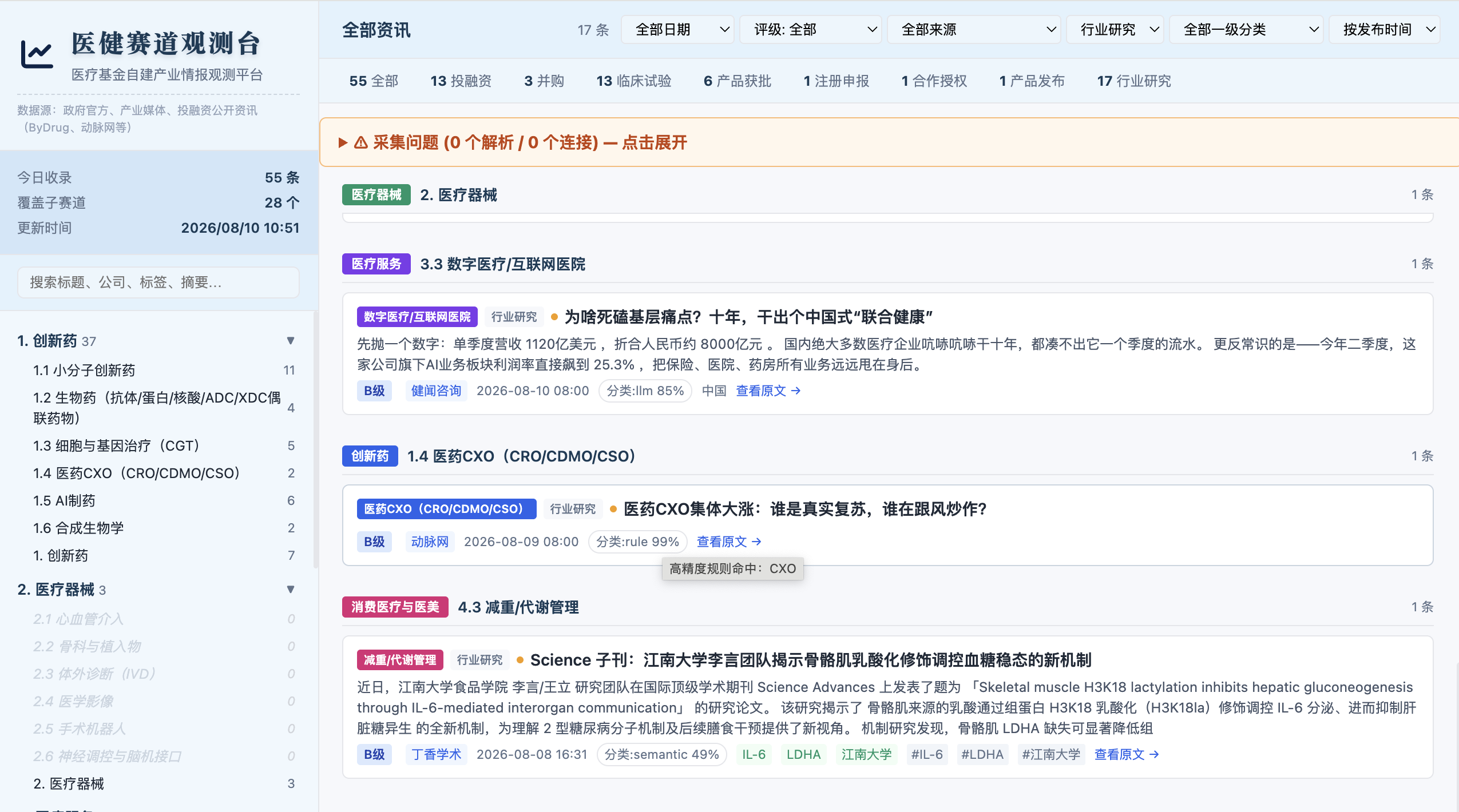
HTML 看板 (抓取原始信息分类)
其中html看板用来筛选分类,可视化展示
- 左边栏-- 按照需求筛选对应的医疗主题,比如 小分子创新药/ 生物药...
- 顶部标签-- 筛选资本市场的时间,比如 投融资/获批/并购...
- 支持搜索关键词 -- 搜公司名称/药物名称 ...
- 支持筛选信息来源 -- 目前覆盖
- 官方监管来源(~20 个):NMPA 药品/器械/化妆品、FDA、EMA、PMDA、TGA 等,覆盖中/美/欧/日/加/澳/英/新加坡/瑞士的审批动态
- 直接抓取站点(2 个):动脉网的最新动态和投融资
- ByDrug 聚合来源(~130+ 个):中文医药行业媒体、药企官方号、专业数据库,分 A/B/C 三级
- 分级信息-- A级来自政府,B级来自医药网站,C级来自医药媒体
- 如果采集出现故障会写入 “采集问题” -- 需要人工访问网页查询
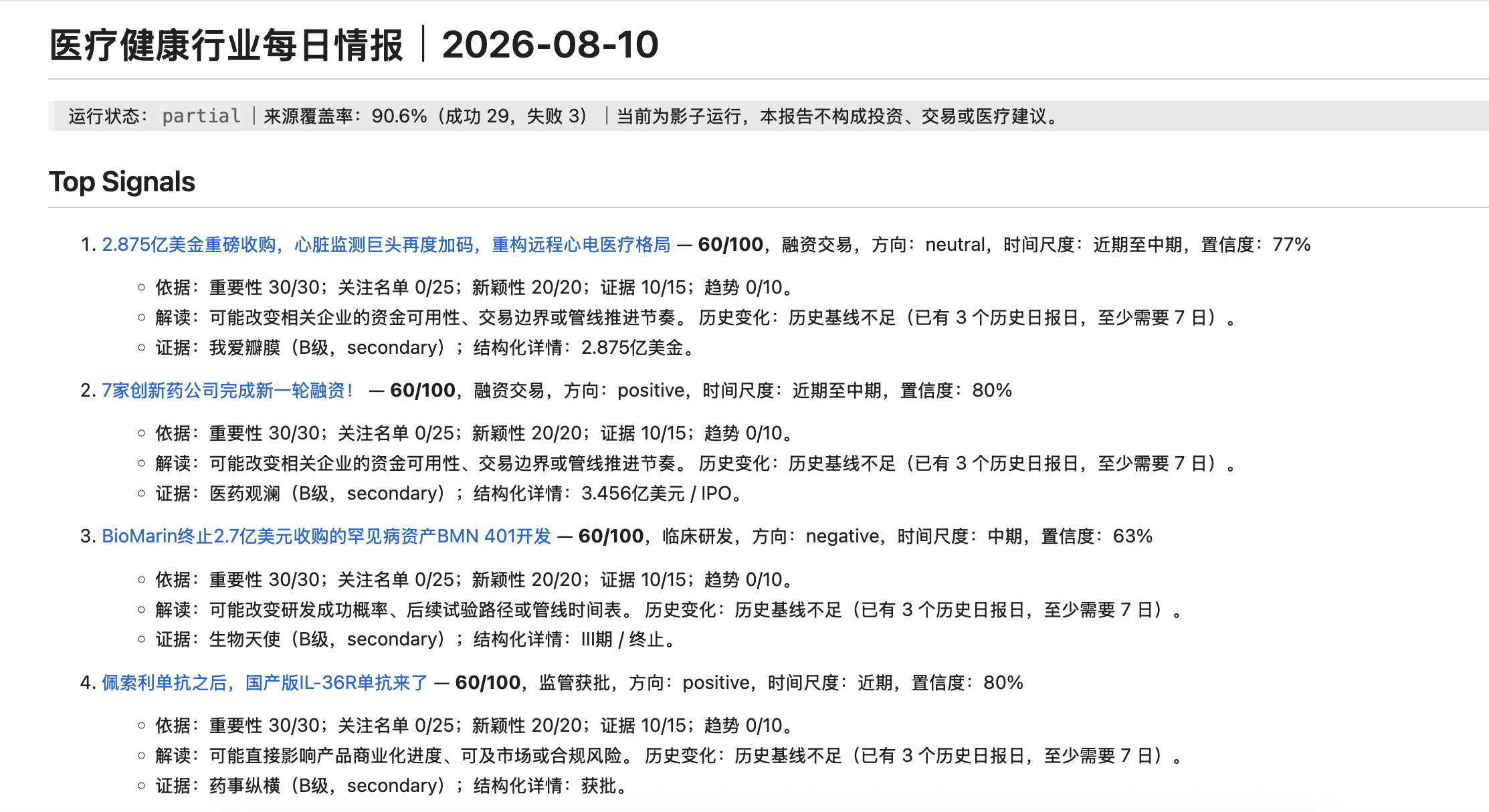
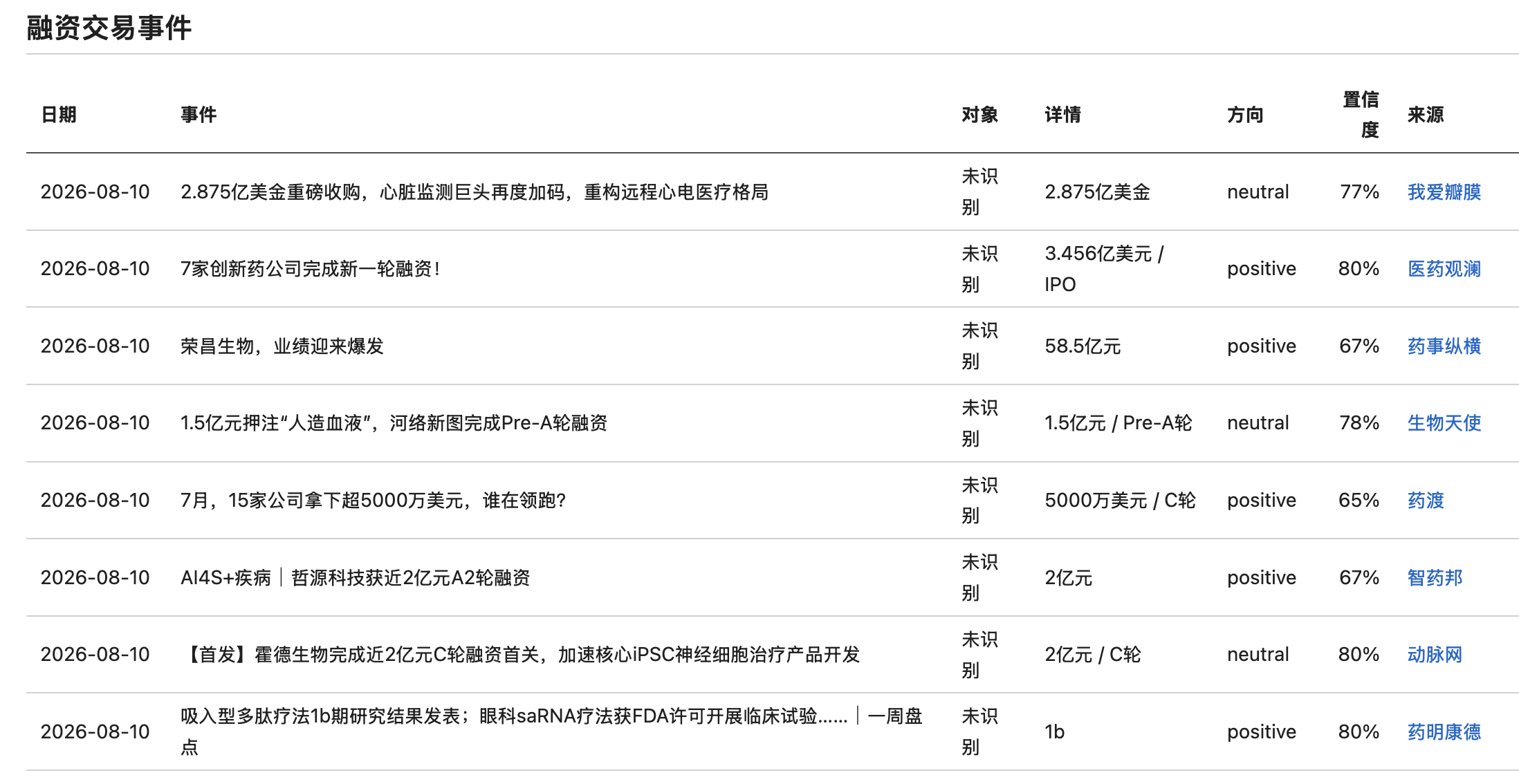
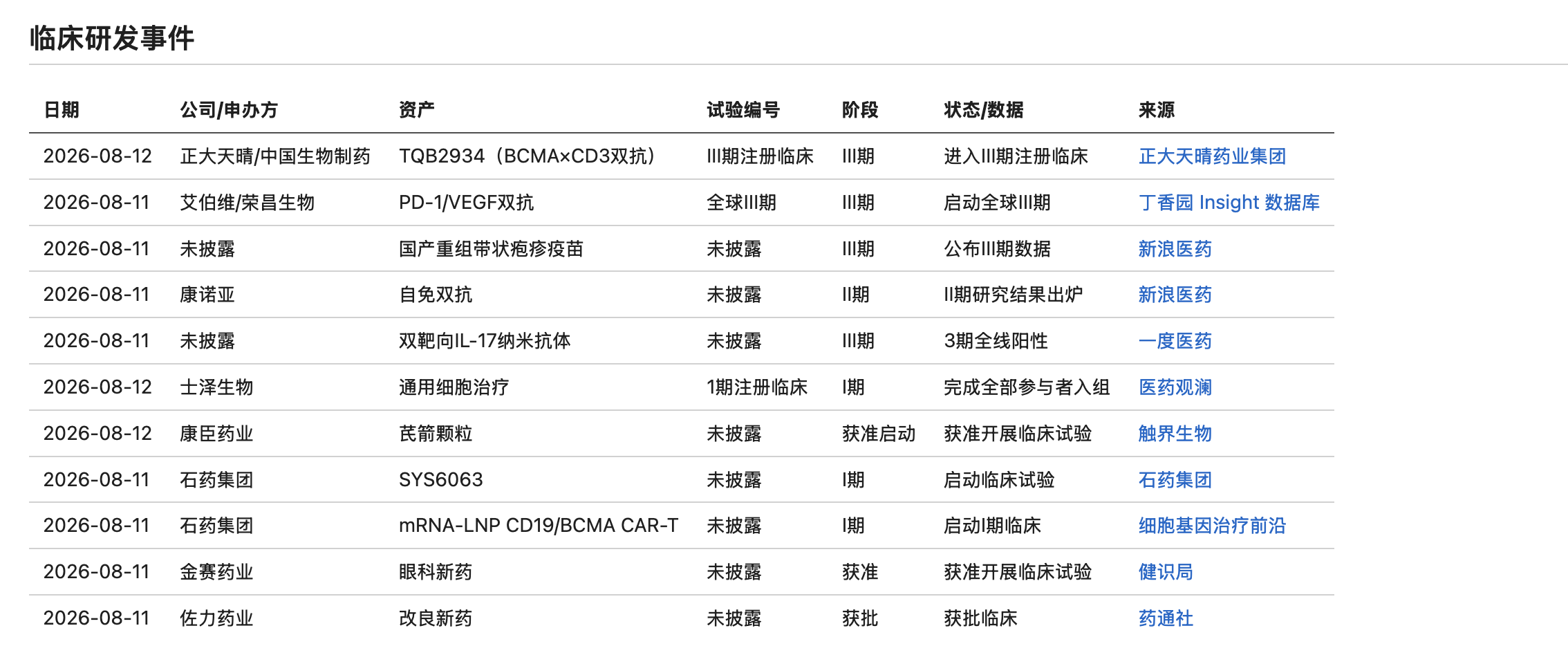
影子日报 (由LLM处理采集信息生成)
- 提炼每天最重要的信息和新闻
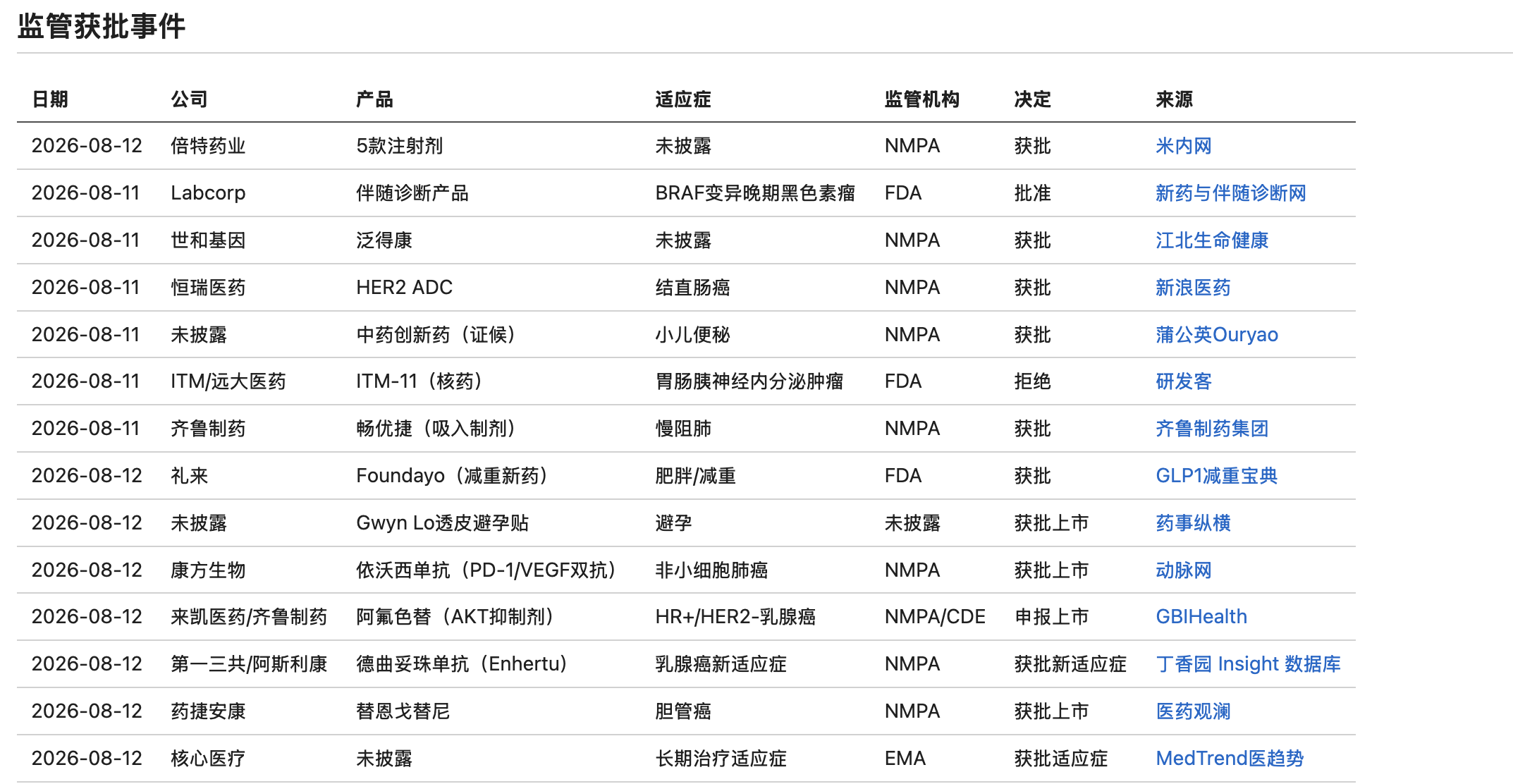
- 包括 Top 10 signal,投资交易事件,监管获批事件,临床研发事件
- 影子日报 最后一栏,记录不确定事件列表,引用时需要人工复核
- markdown文档格式 (建议用obsidian打开,obsidian教程附上-30分钟学会obsidian:
🛠 18 previous messages
18 previous messages

> 先看看当前来源注册表的结构,以及采集器是怎么处理直接抓取来源的。
>
> Explored a file, 3 searches
>
> - Read `./healthcare-runtime/sources.md`
> - Searched for `source_direct\|vbdata\|动脉网.*直接\|direct.*source` in `dashboard_scraper.py`
> - Searched for `vbdata\|动脉网\|def scrape_vb\|def fetch_vb\|class.*Vbdata` in `dashboard_scraper.py`
> - Searched for `vbdata\|动脉网\|source_direct` in `dashboard_scraper.py`
>
>
>
> 这个来源需要写新的抓取逻辑。让我先看看 cnpharm.com 的页面结构。
>
> Explored a file, a search, ran a command
>
> - Ran `curl -sL --max-time 15 'https://www.cnpharm.com/sy/yw/' -o /tmp/cnpharm.html && wc -c /tmp/cnpharm.html && head -200 /tmp/cnpharm.html`
>
> Explored a file, a search
>
> - Searched for `class="box"\|class="lefttit"\|class="newlist"\|data-time\|<li>\|class="cline"` in `cnpharm.html`
> - Read `/tmp/cnpharm.html`
>
>
>
>
>
> 页面结构很清晰,HTML 干净规整。现在开始修改:添加来源注册、写抓取函数、集成到采集管线。
>
> Explored 2 files
>
> - Read `~/.codex/skills/monitor-healthcare-intelligence/scripts/dashboard_scraper.py`
> - Read `~/.codex/skills/monitor-healthcare-intelligence/scripts/dashboard_scraper.py`
>
>
>
> Now let me look at the `fetch_html` function and imports to understand the full pattern.
>
> Explored a file
>
> - Read `~/.codex/skills/monitor-healthcare-intelligence/scripts/dashboard_scraper.py`
>
>
>
> 结构清楚了,开始实现三步修改。
>
> Explored 2 searches, ran a command
>
> Explored a search
>
> - Searched for `动脉网-投融资` in `sources.md`
>
>
>
> - Ran `sed -i '' '62a\
> | 中国医药报-要闻 | 专业媒体 | B | https://www.cnpharm.com/sy/yw/ | 药品/器械/化妆品监管政策与行业要闻 |
> ' /Users/hello/.codex/skills/monitor-healthcare-intelligence/references/sources.md
> sed -i '' '62a\
> | 中国医药报-要闻 | 专业媒体 | B | https://www.cnpharm.com/sy/yw/ | 药品/器械/化妆品监管政策与行业要闻 |
> ' /Users/hello/Documents/Codex/2026-08-10/ban/healthcare-runtime/sources.md
> echo "done"`
>
> Explored a search
>
> - Searched for `中国医药报-要闻` in `sources.md`
>
>
>
>
>
> 来源注册表已更新。现在添加抓取函数。
>
> Explored a file, 2 searches, ran 4 commands
>
> Explored 4 files, a search
>
> - Searched for `^def scrape_vbdata` in `dashboard_scraper.py`
> - Read `~/.codex/skills/monitor-healthcare-intelligence/scripts/dashboard_scraper.py`
> - Read `~/.codex/skills/monitor-healthcare-intelligence/scripts/dashboard_scraper.py`
> - Read `~/.codex/skills/monitor-healthcare-intelligence/scripts/dashboard_scraper.py`
> - Read `~/.codex/skills/monitor-healthcare-intelligence/scripts/dashboard_scraper.py`
>
>
>
> - Ran `cp /Users/hello/.codex/skills/monitor-healthcare-intelligence/scripts/dashboard_scraper.py /Users/hello/Documents/Codex/2026-08-10/ban/healthcare-runtime/dashboard_scraper.py
> echo "copied"`
>
> - Ran `cd /Users/hello/Documents/Codex/2026-08-10/ban/healthcare-runtime
>
> # Find line numbers
> grep -n '#  Source 2: ByDrug' dashboard_scraper.py
> grep -n '^    if not source_filter or source_filter == "vbdata"' dashboard_scraper.py
> grep -n 'print("\\\\n\[3/3\] 政府获批来源")' dashboard_scraper.py`
>
> Explored a search
>
> - Searched for `政府获批来源` in `dashboard_scraper.py`
>
>
>
> - Ran `python3 << 'PYEOF'
> path = "/Users/hello/Documents/Codex/2026-08-10/ban/healthcare-runtime/dashboard_scraper.py"
>
> with open(path, 'r') as f:
>     lines = f.readlines()
>
> # 1. Insert scrape_cnpharm() function before line 287 (0-indexed: 286)
> cnpharm_func = '''
> def scrape_cnpharm() -> list[dict]:
>     """爬取中国医药报要闻频道: https://www.cnpharm.com/sy/yw/"""
>     html = fetch_html("https://www.cnpharm.com/sy/yw/")
>     articles: list[dict] = []
>
>     boxes = re.findall(
>         r\'<li class="box\\s*">(.*?)</li>\',
>         html, re.DOTALL
>     )
>     for box in boxes:
>         title_m = re.search(
>             r\'<a[^>]*title="([^"]*)"[^>]*href="(/c/\\d{4}-\\d{2}-\\d{2}/\\d+\\.shtml)"[^>]*>(.*?)</a>\',
>             box, re.DOTALL
>         )
>         if not title_m:
>             continue
>         title = title_m.group(1).strip()
>         href = title_m.group(2)
>         link = "https://www.cnpharm.com" + href
>
>         date_m = re.search(r\'<span class="fr">(\\d{4}-\\d{2}-\\d{2})</span>\', box)
>         date = date_m.group(1) if date_m else ""
>
>         classification = classify_article_details(title, "", [])
>
>         articles.append({
>             "title": title,
>             "summary": "",
>             "source": "中国医药报",
>             "source_url": link,
>             "source_rating": "B",
>             "publish_time": date,
>             **classification,
>             "source_type": "cnpharm",
>         })
>
>     return articles
>
> '''
>
> lines.insert(286, cnpharm_func)
>
> # 2. Update step numbering and add cnpharm step
> # Find and update the vbdata block
> for i, line in enumerate(lines):
>     if 'print("\\n[1/3] 动脉网 vbdata.cn' in line:
>         lines[i] = line.replace('[1/3]', '[1/4]')
>     elif 'print("\\n[2/3] ByDrug 聚合来源")' in line:
>         # Insert cnpharm step before this line
>         cn_step = '''    if not source_filter or source_filter == "cnpharm":
>         print("\\n[2/4] 中国医药报 cnpharm.com(要闻频道)")
>         cn_articles = scrape_cnpharm()
>         if window_start and window_end:
>             cn_articles = filter_by_time_window(cn_articles, window_start, window_end)
>             print(f"  中国医药报: {len(cn_articles)} 篇(时间过滤后)")
>         else:
>             print(f"  中国医药报: {len(cn_articles)} 篇")
>         all_articles.extend(cn_articles)
>
> '''
>         lines[i] = line.replace('[2/3]', '[3/4]')
>         lines.insert(i, cn_step)
>     elif 'print("\\n[3/3] 政府获批来源")' in line:
>         lines[i] = line.replace('[3/3]', '[4/4]')
>
> with open(path, 'w') as f:
>     f.writelines(lines)
>
> print("Done")
> PYEOF`
>
> - Ran `cd /Users/hello/Documents/Codex/2026-08-10/ban/healthcare-runtime
>
> # Verify the new function exists
> grep -n 'def scrape_cnpharm' dashboard_scraper.py
>
> # Verify pipeline steps
> grep -n '\[.*/4\]' dashboard_scraper.py
>
> # Verify the cnpharm step
> grep -n 'source_filter == "cnpharm"' dashboard_scraper.py`
>
>
>
> 现在更新管线和定时脚本指向本地修改版。
>
> Ran a command
>
> - Ran `sed -i '' 's|python3 "$SKILL_DIR/dashboard_scraper.py"|python3 "$(dirname "$0")/dashboard_scraper.py"|' /Users/hello/Documents/Codex/2026-08-10/ban/healthcare-runtime/run_pipeline.sh
> echo "updated"`
>
>
>
> 现在测试一下 cnpharm 抓取是否正常。
>
> Ran a command
>
> - Ran `cd /Users/hello/Documents/Codex/2026-08-10/ban/healthcare-runtime
> python3 -c "
> import sys
> sys.path.insert(0, '/Users/hello/.codex/skills/monitor-healthcare-intelligence/scripts')
> sys.path.insert(0, '.')
>
> # Test the cnpharm scraper in isolation
> exec(open('dashboard_scraper.py').read().split('#  Source 2: ByDrug')[0])
> articles = scrape_cnpharm()
> print(f'CNPHARM: {len(articles)} articles')
> for a in articles[:5]:
>     print(f'  [{a[\"publish_time\"]}] {a[\"title\"][:60]}')
>     print(f'    -> {a[\"source_url\"]}')
>     print(f'    -> {a[\"level_1_category\"]} / {a[\"level_2_category\"]}')
> "`
>
>
>
> 抓取成功,40 篇文章。现在跑一次完整采集验证管线。
>
> Explored 2 files, 5 searches, ran 8 commands
>
> - Ran `export HEALTHCARE_RUNTIME_ROOT=/Users/hello/project/healthcare-intelligence-runtime
> DATE_STR=$(date +%Y-%m-%d)
> START_TIME=$(date -v-48H '+%Y-%m-%d %H:%M')
> END_TIME=$(date '+%Y-%m-%d %H:%M')
> DATA_DIR="$HEALTHCARE_RUNTIME_ROOT/data/$DATE_STR"
>
> echo "=== 仅测试 cnpharm 源 ==="
> python3 /Users/hello/Documents/Codex/2026-08-10/ban/healthcare-runtime/dashboard_scraper.py \
>   --data-dir "$DATA_DIR" \
>   --start "$START_TIME" \
>   --end "$END_TIME" \
>   --source cnpharm`
>
> Explored a file
>
> - Read `./healthcare-runtime/dashboard_scraper.py`
>
>
>
> - Ran `sed -i '' '/^    if not source_filter or source_filter == "bydrug":$/{ N; /^    if not source_filter or source_filter == "bydrug":\n    if not source_filter or source_filter == "cnpharm":$/d; }' /Users/hello/Documents/Codex/2026-08-10/ban/healthcare-runtime/dashboard_scraper.py
> echo "fixed"`
>
> Explored a file
>
> - Read `./healthcare-runtime/dashboard_scraper.py`
>
>
>
> - Ran `python3 << 'PYEOF'
> path = "/Users/hello/Documents/Codex/2026-08-10/ban/healthcare-runtime/dashboard_scraper.py"
> with open(path) as f:
>     content = f.read()
>
> # Find the broken section and replace it
> old = '''        all_articles.extend(vb_articles)
>
>         print("\\n[2/4] 中国医药报 cnpharm.com(要闻频道)")
>         cn_articles = scrape_cnpharm()
>         if window_start and window_end:
>             cn_articles = filter_by_time_window(cn_articles, window_start, window_end)
>             print(f"  中国医药报: {len(cn_articles)} 篇(时间过滤后)")
>         else:
>             print(f"  中国医药报: {len(cn_articles)} 篇")
>         all_articles.extend(cn_articles)
>
>         print("\\n[3/4] ByDrug 聚合来源")'''
>
> new = '''        all_articles.extend(vb_articles)
>
>     if not source_filter or source_filter == "cnpharm":
>         print("\\n[2/4] 中国医药报 cnpharm.com(要闻频道)")
>         cn_articles = scrape_cnpharm()
>         if window_start and window_end:
>             cn_articles = filter_by_time_window(cn_articles, window_start, window_end)
>             print(f"  中国医药报: {len(cn_articles)} 篇(时间过滤后)")
>         else:
>             print(f"  中国医药报: {len(cn_articles)} 篇")
>         all_articles.extend(cn_articles)
>
>     if not source_filter or source_filter == "bydrug":
>         print("\\n[3/4] ByDrug 聚合来源")'''
>
> content = content.replace(old, new)
>
> with open(path, 'w') as f:
>     f.write(content)
>
> print("Done")
> PYEOF`
>
> Explored a file
>
> - Read `./healthcare-runtime/dashboard_scraper.py`
>
>
>
> - Ran `export HEALTHCARE_RUNTIME_ROOT=/Users/hello/project/healthcare-intelligence-runtime
> DATE_STR=$(date +%Y-%m-%d)
> START_TIME=$(date -v-48H '+%Y-%m-%d %H:%M')
> END_TIME=$(date '+%Y-%m-%d %H:%M')
> DATA_DIR="$HEALTHCARE_RUNTIME_ROOT/data/$DATE_STR"
>
> echo "=== 测试 cnpharm 源 ==="
> python3 /Users/hello/Documents/Codex/2026-08-10/ban/healthcare-runtime/dashboard_scraper.py \
>   --data-dir "$DATA_DIR" \
>   --start "$START_TIME" \
>   --end "$END_TIME" \
>   --source cnpharm`
>
> - Ran `export HEALTHCARE_RUNTIME_ROOT=/Users/hello/project/healthcare-intelligence-runtime
> export PYTHONPATH=/Users/hello/.codex/skills/monitor-healthcare-intelligence/scripts:$PYTHONPATH
> DATE_STR=$(date +%Y-%m-%d)
> START_TIME=$(date -v-48H '+%Y-%m-%d %H:%M')
> END_TIME=$(date '+%Y-%m-%d %H:%M')
> DATA_DIR="$HEALTHCARE_RUNTIME_ROOT/data/$DATE_STR"
>
> python3 /Users/hello/Documents/Codex/2026-08-10/ban/healthcare-runtime/dashboard_scraper.py \
>   --data-dir "$DATA_DIR" \
>   --start "$START_TIME" \
>   --end "$END_TIME" \
>   --source cnpharm`
>
> Explored a file, 4 searches
>
> - Searched for `def filter_by_time_window` in `dashboard_scraper.py`
> - Read `~/.codex/skills/monitor-healthcare-intelligence/scripts/dashboard_scraper.py`
> - Searched for `date_m.group(1)` in `dashboard_scraper.py`
> - Searched for `date = `
> - Searched for `date =.*date_m` in `dashboard_scraper.py`
>
>
>
> - Ran `export HEALTHCARE_RUNTIME_ROOT=/Users/hello/project/healthcare-intelligence-runtime
> export PYTHONPATH=/Users/hello/.codex/skills/monitor-healthcare-intelligence/scripts:$PYTHONPATH
> DATE_STR=$(date +%Y-%m-%d)
> START_TIME=$(date -v-48H '+%Y-%m-%d %H:%M')
> END_TIME=$(date '+%Y-%m-%d %H:%M')
> DATA_DIR="$HEALTHCARE_RUNTIME_ROOT/data/$DATE_STR"
>
> python3 /Users/hello/Documents/Codex/2026-08-10/ban/healthcare-runtime/dashboard_scraper.py \
>   --data-dir "$DATA_DIR" \
>   --start "$START_TIME" \
>   --end "$END_TIME" \
>   --source cnpharm`
>
> Explored a file, a search
>
> - Searched for `def parse_time` in `dashboard_scraper.py`
> - Read `~/.codex/skills/monitor-healthcare-intelligence/scripts/dashboard_scraper.py`
>
>
>
> - Ran `python3 << 'PYEOF'
> import sys
> sys.path.insert(0, '/Users/hello/.codex/skills/monitor-healthcare-intelligence/scripts')
> sys.path.insert(0, '/Users/hello/Documents/Codex/2026-08-10/ban/healthcare-runtime')
>
> from dashboard_scraper import scrape_cnpharm, parse_time
> import datetime as dt
>
> articles = scrape_cnpharm()
> print(f"Total: {len(articles)}")
>
> # Check which ones fall in the 48h window
> window_start = dt.datetime(2026, 8, 8, 12, 53)
> window_end = dt.datetime(2026, 8, 10, 12, 53)
>
> in_window = 0
> for a in articles:
>     t_raw = a.get("publish_time", "")
>     t = parse_time(t_raw)
>     if t:
>         in_win = window_start <= t <= window_end
>         if in_win:
>             in_window += 1
>             print(f"  IN:  [{a['publish_time']}] {a['title'][:60]}")
>     else:
>         print(f"  BAD: [{a['publish_time']}] {a['title'][:40]}")
>
> print(f"\nIn window: {in_window}/{len(articles)}")
> PYEOF`
>
> - Ran `export HEALTHCARE_RUNTIME_ROOT=/Users/hello/project/healthcare-intelligence-runtime
> export PYTHONPATH=/Users/hello/.codex/skills/monitor-healthcare-intelligence/scripts:$PYTHONPATH
> DATE_STR=$(date +%Y-%m-%d)
> DATA_DIR="$HEALTHCARE_RUNTIME_ROOT/data/$DATE_STR"
>
> python3 /Users/hello/Documents/Codex/2026-08-10/ban/healthcare-runtime/dashboard_scraper.py \
>   --data-dir "$DATA_DIR" \
>   --start "2026-07-30 00:00" \
>   --end "2026-08-10 23:59" \
>   --source cnpharm`
>
>完美运行。31 篇文章通过时间过滤,分类分布:
| 分类 | 篇数 |
|---|---|
| 其他/综合 | 24(政策监管类) |
| 1. 创新药 | 5 |
| 2. 医疗器械 | 2 |
中国医药报(cnpharm.com)已完整接入。改动汇总:
- 来源注册:
sources.md新增中国医药报-要闻(B 级) - 抓取函数:
scrape_cnpharm()— 解析<li class="box">结构,提取标题/日期/链接,送入三层分类引擎 - 管线位置:采集步骤从
[1/3 ~ 3/3]变为[1/4 ~ 4/4],中国医药报在第二步 - 定时脚本:
run_pipeline.sh已指向本地修改版
每天 10:00 的自动运行会一并采集中国医药报的要闻频道。刚才那次实际窗口内没有 Aug 8-10 的文章是因为该页面最新只到 Aug 7——正常现象,明天就会有新的。